AWS and Azure: Unlocking Seamless Cloud Integration for DevOps Success
The cloud landscape is shifting constantly. Single-cloud reliance is becoming a thing of the past. Modern businesses demand flexibility. They need the best of.
On this page
Introduction
The cloud landscape is shifting constantly. Single-cloud reliance is becoming a thing of the past. Modern businesses demand flexibility. They need the best of all worlds. This is where a multi-cloud strategy shines. Combining AWS and Azure offers immense power. It unlocks new possibilities for innovation. But it also brings unique challenges. Silos can form easily between clouds. Data can get trapped in one environment. Teams struggle with disjointed workflows. This article solves that problem for you. We will explore seamless integration strategies. You will learn to unify your DevOps processes. From networking to identity management, we cover it all. Strategic partners like Devolity Business Solutions are key here. They help bridge the gap effectively. Read on to transform your cloud approach. Let’s unlock true DevOps success together. 🚀
Why Multi-Cloud is the New Normal 🌐
The Rise of Hybrid Architectures
Organizations are diversifying rapidly. Reliance on one vendor is risky. Outages happen, even to giants. AWS and Azure together provide redundancy. If one region fails, the other takes over. This ensures high availability for your apps. It is a safety net for your business. You also get access to unique features. Azure shines with seamless Microsoft integration. AWS leads in serverless and broad services. Using both gives you a competitive edge. You pick the best tool for the job. Cost optimization becomes easier too. You can leverage spot instances on both. You can negotiate better deals with vendors. This flexibility drives business growth.
Need expert engineering support? Discover Devolity Cloud Migration Solutions or schedule an architecture consultation with our team.
Breaking Down Silos
Data silos kill productivity. Departments often choose their own clouds. Marketing might love AWS for analytics. HR might prefer Azure for Office 365. This creates a fragmented IT landscape. Information flows become blocked. Integration breaks these walls down. It allows data to move freely. It creates a cohesive operational environment. Teams can collaborate without friction. Unified visibility improves decision making. You get a holistic view of your resources. This is essential for modern DevOps success.
Key Integration Challenges 🚧
Integrating clouds is not a walk in the park. It requires careful planning and execution. Here are the main hurdles you will face.
1. Network Latency and Connectivity
Connecting two clouds introduces lag. Data has to travel across the internet. This can slow down applications. It affects user experience significantly. Consistent performance is hard to guarantee. You need robust networking solutions.
2. Security and Compliance
Security policies differ between providers. AWS IAM is not Azure AD. Mapping permissions is a complex task. A mistake here can leave you exposed. Data sovereignty is another concern. You must comply with diverse regulations. Unified governance is critical. Cyber Security must be a top priority.
3. Tool Chain Fragmentation
DevOps teams often use different tools. One team uses Azure DevOps. Another swears by AWS CodePipeline. This creates mess and confusion. Standardizing the toolchain is vital. You need a unified "single pane of glass."
Networking Essentials: The Bridge 🌉
Connectivity is the backbone of integration. You have several options to connect them. Choosing the right one is crucial. Let's compare the most common methods.
| Feature | VPN (Site-to-Site) | Direct Connect & ExpressRoute |
|---|---|---|
| Cost | Low 💰 | High 💰💰💰 |
| Speed | Moderate (Internet-based) | High (Private connection) |
| Reliability | Variable | Consistent SLA |
| Security | Encrypted tunnel | Private, isolated link |
| Complexity | Low Setup | High Setup |
| Best For | PoC, Small Workloads | Enterprise, Big Data |
VPN Gateway Connectivity
This is the easiest starting point. You set up a VPN tunnel. It goes over the public internet. It is cheap and quick to deploy. Agencies often start here. It connects an AWS VPC to an Azure VNet. However, it has limitations. Throughput is limited by the internet. Latency can be unpredictable. It is great for non-critical data.
Direct Interconnection
For serious workloads, you need power. This involves AWS Direct Connect and Azure ExpressRoute. You link them via an exchange provider. Traffic never touches the public internet. This ensures low latency and high security. It is ideal for Devolity Hosting scenarios. Large enterprises rely on this method. It provides a stable backbone for apps.
Identity Management: One ID to Rule Them All 🆔
Unifying Identity
Managing users twice is a nightmare. It ruins the developer experience. It creates security gaps constantly. The solution is Single Sign-On (SSO). Azure Active Directory (Azure AD) is the leader here. It acts as the central identity provider. You can use it to log into AWS. This allows for centralized user management.
Setting Up SSO
You configure AWS as an "Enterprise Application". It lives inside your Azure AD tenant. Users use their Microsoft credentials. They authenticate once to access AWS. This simplifies onboarding and offboarding. If an employee leaves, you disable one account. Access to both clouds is revoked instantly. This boosts security posture significantly. Role-Based Access Control (RBAC) becomes easier. You map Azure groups to AWS roles. Automation makes this scalable. (More on Automation later).
Unified DevOps Pipelines 🛠️
CI/CD Across Clouds
DevOps is about speed and reliability. You need to deploy anywhere, anytime. Your pipeline should be cloud-agnostic. Do not lock yourself into one vendor's tools. Tools like Jenkins or GitLab CI are great. They can deploy to both AWS and Azure. Terraform is the hero here. It is the standard for Infrastructure as Code (IaC).
The Power of Terraform
Terraform uses a common language (HCL). You define resources for both clouds. You can spin up an EC2 instance. And a simple Azure SQL database. All in the same configuration file. This ensures consistency across environments. It reduces "configuration drift" drastically. Your infrastructure becomes version-controlled. You can audit changes easily. DevOps teams love this control. It enables true multi-cloud agility.
Unifying Compute with Kubernetes ☸️
Containers are the universal language of cloud. They run identically on AWS and Azure. But managing clusters individually is a pain. You end up with fragmented operations. Azure Arc is the game changer here. It projects AWS resources into Azure. You can see your AWS EKS clusters in the Azure Portal. You can apply Azure Policies to them. It provides a single control plane. This simplifies compliance and governance. You can deploy apps to both clouds from one Git repo. GitOps becomes a reality with FluxCD. This is the holy grail of hybrid cloud.
Security & Governance at Scale 🛡️
Centralized Visibility
You cannot protect what you cannot see. Visibility is the first step in security. Tools like Azure Defender for Cloud help. They can monitor AWS resources too. This gives you a unified security dashboard. You see alerts from both clouds in one place. This reduces "alert fatigue" for teams. AI helps analyze these threats faster. It predicts attacks before they happen.
Policy Enforcement
Governance ensures you stay compliant. You need rules that apply everywhere. Use tools to enforce these policies. Prevent users from opening public ports. Ensure all data is encrypted at rest. Automated compliance checks are a must. They run constantly in the background. They fix issues automatically when possible. This keeps your auditors happy. It keeps your customer data safe. Security is a journey, not a destination.
Resilience and Disaster Recovery 🔄
Multi-cloud enables true high availability. Cloud providers have outages. It is a fact. If AWS US-East goes down, what happens? With a multi-cloud strategy, you fail over. You can run active-active workloads. Load balance traffic between AWS and Azure. But data gravity is the challenge. You need constant replication. Tools like cross-cloud replication help. Define your RTO and RPO clearly. Test your failover plans regularly. Don't wait for a disaster to find bugs. This is your insurance policy.
Technical Implementation & Case Study 🏗️
Let’s look at a real-world example. GlobalFinTech Inc. faced a major hurdle. They had a legacy app on-premise. They moved the frontend to Azure. They kept the database on AWS. The result was a disaster initially. Latency spiked to over 300ms. User complaints skyrocketed. Transfers timed out frequently. They needed a fix fast.
The "Before" State
- Architecture: Fragmented and slow.
- Connectivity: Public Internet VPN.
- Latency: High (300ms average).
- Security: Basic encryption, hard to manage.
- Deployment: Manual scripts, error-prone.
The "After" Solution
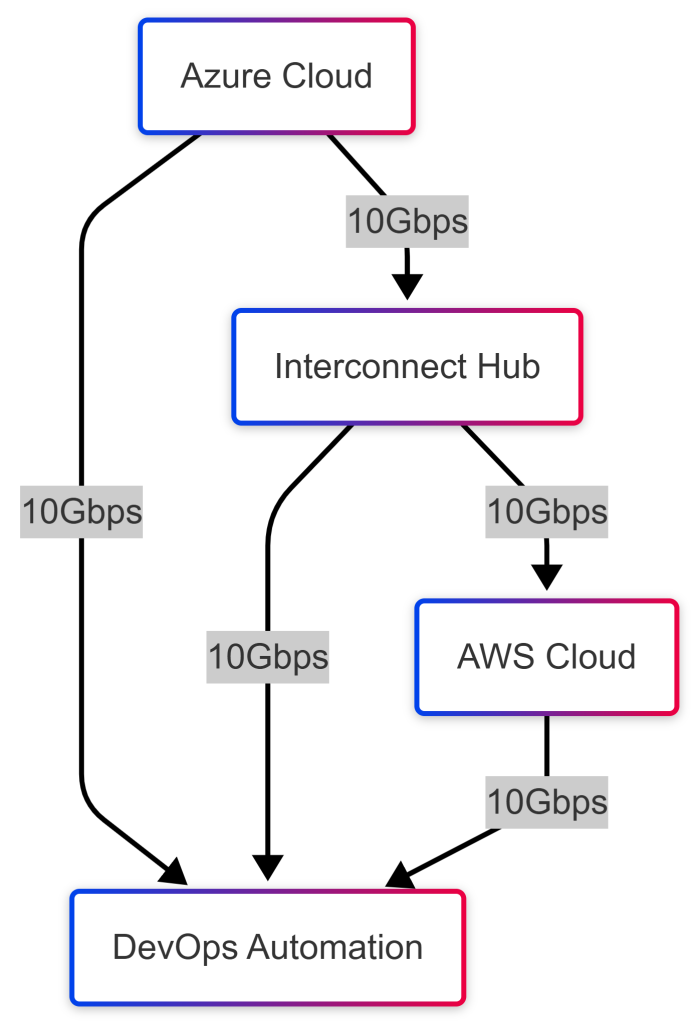
They brought in Devolity Business Solutions. The team designed a robust hybrid network. They used Azure ExpressRoute and AWS Direct Connect. They connected them via a carrier-neutral facility. This bypassed the public internet completely. They implemented Terraform for all infrastructure.
Architecture Visualization
Here is how the optimized traffic flows.
Infrastructure as Code (IaC) Example
Here is the Terraform code they used. This snippet sets up the VPN connection.
resource "aws_vpn_connection" "main" { vpn_gateway_id = aws_vpn_gateway.vpn_gw.id customer_gateway_id = aws_customer_gateway.customer_gw.id type = "ipsec.1" static_routes_only = true tags = { Name = "Azure-AWS-Link" Environment = "Production" }}resource "azurerm_virtual_network_gateway_connection" "onprem" { name = "AWS-Connection" location = azurerm_resource_group.rg.location resource_group_name = azurerm_resource_group.rg.name type = "IPsec" virtual_network_gateway_id = azurerm_virtual_network_gateway.vng.id local_network_gateway_id = azurerm_local_network_gateway.lng.id shared_key = "SuperSecretKey123!"}The results were instant and dramatic. Latency dropped to under 20ms. Data transfer speeds increased by 500%. Security compliance was fully automated. The DevOps team could sleep at night.
Troubleshooting Guide 🔧
Even the best plans face issues. Here is your cheat sheet for fixes. This table covers common integration headaches.
| Symptom | Root Cause | Solution |
|---|---|---|
| High Latency | Public Internet routing | Switch to Direct Connect or ExpressRoute. |
| Connection Flapping | IKE Version Mismatch | Ensure both sides use IKEv2. |
| Auth Failures | Token Expiration | Increase token lifetime in Identity Provider. |
| Deployment Fails | API Rate Limits | Implement exponential backoff in scripts. |
| Data sync errors | Schema mismatch | Use schema validation tools before sync. |
| DNS Resolution | Private Zones not linked | Configure Route53 and Azure DNS forwarding. |
Pro Tip: Always check your logs first. CloudWatch (AWS) and Monitor (Azure) are your friends.
Mastering Multi-Cloud Costs (FinOps) 💰
Using two clouds can double your complexity. It can also explode your costs. If you are not careful, bills will skyrocket. You need a solid FinOps culture. Tagging is your best weapon. Tag every resource strictly. "Env=Prod", "CostCenter=DevOps". Use AWS Cost Explorer and Azure Cost Management. Normalize cost data across providers. Identify waste immediately. Shut down unused dev environments. Use Spot Instances for stateless workloads. Negotiate Enterprise Agreements (EA) for better rates. Smart spending drives profitability.
How Devolity Business Solutions Optimizes Your Setup 🚀
Implementing this alone is risky. You need a partner who knows the terrain. Devolity Business Solutions is that partner. We specialize in multi-cloud mastery. Our team holds top-tier certifications. We are experts in AWS Cloud, Azure Cloud, and Google Cloud. We don't just build; we optimize. Our Devolity Hosting services are world-class. We ensure your infrastructure is bulletproof. We integrate Cyber Security from day one. We automate everything with AI and Terraform. We have saved clients millions in cloud costs. Trust us to navigate the complexity for you. Your success is our only metric.
Conclusion
The future is multi-cloud. Integrating AWS and Azure is a game-changer. It offers resilience, flexibility, and power. But it requires the right strategy. You need robust networking and unified security. You need automated pipelines and common tools. Don't let silos hold you back. Embrace the complexity and master it. Use the tools and tips shared here. Partner with experts like Devolity Business Solutions. Start your seamless integration journey today. The cloud is yours to command. 🚀
FAQs
Q1: Is multi-cloud expensive? A: It can be, but proper optimization and spot instances often save money in the long run.
Q2: Can I use one login for both? A: Yes! Azure AD can provide Single Sign-On (SSO) for AWS accounts.
Q3: Which tool is best for IaC? A: Terraform is the industry standard for multi-cloud as it supports all major providers.
Q4: Is latency a major issue? A: Only if you rely on the public internet. Private links like Direct Connect solve this.
Q5: strategies Do I need a specialized partner? A: Complex setups benefit greatly from expert guidance to avoid costly mistakes.
References & Extras 📚
Authoritative Sources
- Red Hat: What is Multi-Cloud?
- AWS Direct Connect Documentation
- Azure ExpressRoute Overview
- Terraform: Manage AWS and Azure
- Google Cloud Integration Patterns
- Devolity Business Solutions
- NIST Cloud Computing Guidelines
- Microsoft Identity Platform
Transform Business with Cloud
Devolity simplifies state management with automation, strong security, and detailed auditing.

Enjoyed this article? Get our DevOps & Cloud newsletter
Production blueprints, zero-downtime cutover notes, and security practices twice a month. Zero spam.
Twice a month · No spam · Unsubscribe anytime
More posts like this
Cloud & Technology
MLOps CI/CD: How to Deploy Machine Learning Models Using CI/CD Pipelines
Mar 17, 2026 · 23 min readCloud & Technology
Cloud & Technology
Xen Server Virtualization on Linux: The Complete Setup and Configuration Guide (2026)
Feb 27, 2026 · 23 min readCloud & Technology

Cloud & Technology
How AI Code Assistants Are Replacing Stack Overflow in 2026
Feb 26, 2026 · 17 min readCloud & Technology